Lenovo Yoga 7 2-in-1 16AKP10 volume control bug

Hello I would like to report a bug for the brand new Lenovo Yoga 7 2-in-1 16AKP10. It has the same sound chip and also the same volume control bug as several older models. I thus assume that the same workaround, written by Philipp Jungkamp and later by Pascal Gross, will also work for this model. There are several lines with laptops that apply this workaround, for example this line in linux/sound/pci/hda/patch_realtek.c: SND_PCI_QUIRK(0x17aa, 0x3801, "Lenovo Yoga9 14IAP7", ALC287_FIXUP_YOGA9_14IAP7_BASS_SPK_PIN) Could you please add this line for my model? SND_PCI_QUIRK(0x????, 0x????, "Lenovo Yoga 7 2-in-1 16AKP10", ALC287_FIXUP_YOGA9_14IAP7_BASS_SPK_PIN), Please advise on how to determine the first two parameters. Thanks a lot for your great work and support. Best regards, --Sandro Gähler
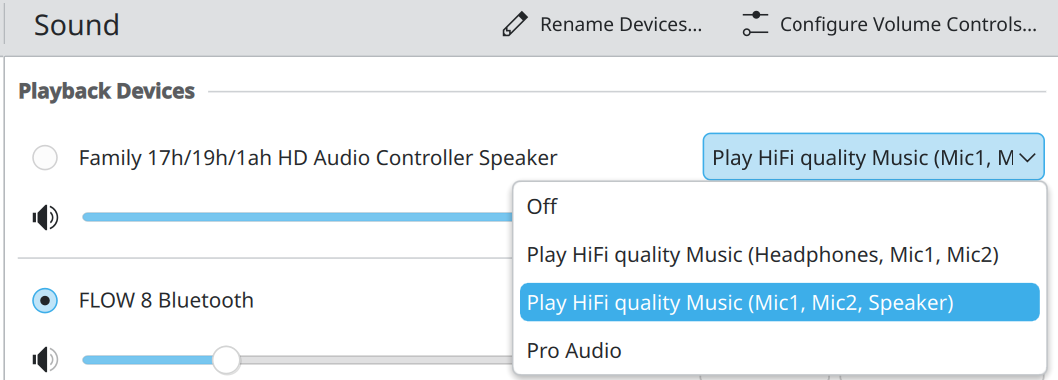
Hello I would like to add some more info to my previous E-Mail: Problem description: The laptop has two speakers above the keyboard, which work as intended. It also has two down-firing speakers (called "Subwoofers", even though they play all frequencies), which always play at 100% volume, regardless of the system volume setting. I have checked this with also-utils. They do mute when the system volume is reduced to 0% though. Problem 2 description: When I plug in headphones, I'd expect them to show up as a new output device, so I can switch between laptop speakers and headphones over the tray icon. Unfortunately, this isn't the case, and instead I have to open the system settings, where I can switch between speakers and headphones in the configuration of this sound card: [image: image.png] Please find the output of alsa-info.sh here: http://alsa-project.org/db/?f=ee42a4871704567a853b025c20a02deed49ef4c0 The card in question is card2. Please also find the file /proc/asound/card2/codec#0 attached. Please also let me know if there's any way in which I can assist solving this issue. Best regards, --Sandro On Fri, 11 Jul 2025 at 13:48, Sandro Gähler <gaehlers@gmail.com> wrote:
Hello
I would like to report a bug for the brand new Lenovo Yoga 7 2-in-1 16AKP10. It has the same sound chip and also the same volume control bug as several older models. I thus assume that the same workaround, written by Philipp Jungkamp and later by Pascal Gross, will also work for this model.
There are several lines with laptops that apply this workaround, for example this line in linux/sound/pci/hda/patch_realtek.c:
SND_PCI_QUIRK(0x17aa, 0x3801, "Lenovo Yoga9 14IAP7", ALC287_FIXUP_YOGA9_14IAP7_BASS_SPK_PIN)
Could you please add this line for my model?
SND_PCI_QUIRK(0x????, 0x????, "Lenovo Yoga 7 2-in-1 16AKP10", ALC287_FIXUP_YOGA9_14IAP7_BASS_SPK_PIN),
Please advise on how to determine the first two parameters.
Thanks a lot for your great work and support.
Best regards, --Sandro Gähler
Hello Unfortunately, my two previous requests didn't fix the issue - but to be honest, they were just guesses from my side what might solve the problem. But now I did some deep research with the tool hda-analyser, and found out that changing node 0x17 from the default of 0x06 to 0x02 does indeed fix the problem, and the volume control now correctly changes the volume of upper and lower speakers, not just the lower ones. Node 0x17 seems to be the balance between the upper and lower speakers, where the other settings (0x03 and 0x08) result in way to little volume in the lower speakers, resulting in a thin, low-end-lacking sound output. Changing from the default 0x06 to 0x02 does indeed change the sound slightly - just enough that I can hear a difference, but I'm not entirely sure what it changes. I think 0x02 has the upper loudspeakers ever so slightly louder than 0x06. It's not ideal that 0x02 changes the sound slightly, but it's easily worth the functioning volume control. I did verify that this change does not affect the sound of connected headphones. [image: image.png] Best regards, --Sandro On Fri, 12 Sept 2025 at 00:53, Sandro Gähler <gaehlers@gmail.com> wrote:
Hello
I would like to add some more info to my previous E-Mail:
Problem description: The laptop has two speakers above the keyboard, which work as intended. It also has two down-firing speakers (called "Subwoofers", even though they play all frequencies), which always play at 100% volume, regardless of the system volume setting. I have checked this with also-utils. They do mute when the system volume is reduced to 0% though.
Problem 2 description: When I plug in headphones, I'd expect them to show up as a new output device, so I can switch between laptop speakers and headphones over the tray icon. Unfortunately, this isn't the case, and instead I have to open the system settings, where I can switch between speakers and headphones in the configuration of this sound card: [image: image.png]
Please find the output of alsa-info.sh here: http://alsa-project.org/db/?f=ee42a4871704567a853b025c20a02deed49ef4c0 The card in question is card2.
Please also find the file /proc/asound/card2/codec#0 attached.
Please also let me know if there's any way in which I can assist solving this issue.
Best regards, --Sandro
On Fri, 11 Jul 2025 at 13:48, Sandro Gähler <gaehlers@gmail.com> wrote:
Hello
I would like to report a bug for the brand new Lenovo Yoga 7 2-in-1 16AKP10. It has the same sound chip and also the same volume control bug as several older models. I thus assume that the same workaround, written by Philipp Jungkamp and later by Pascal Gross, will also work for this model.
There are several lines with laptops that apply this workaround, for example this line in linux/sound/pci/hda/patch_realtek.c:
SND_PCI_QUIRK(0x17aa, 0x3801, "Lenovo Yoga9 14IAP7", ALC287_FIXUP_YOGA9_14IAP7_BASS_SPK_PIN)
Could you please add this line for my model?
SND_PCI_QUIRK(0x????, 0x????, "Lenovo Yoga 7 2-in-1 16AKP10", ALC287_FIXUP_YOGA9_14IAP7_BASS_SPK_PIN),
Please advise on how to determine the first two parameters.
Thanks a lot for your great work and support.
Best regards, --Sandro Gähler


participants (1)
-
 Sandro Gähler